What Charging Cable Does the iPhone 15 Use? Complete Guide
If you just picked up an iPhone 15 and reached for an old charging cable, you may have noticed something: it doesn’t fit. That’s not a defect. Apple changed the charging port on this model, and it changes what kind of iPhone 15 charging cable belongs in your drawer too.
Here’s the short version: the iPhone 15 charges and transfers data through a USB-C port, not the Lightning connector Apple used for over a decade. Any USB-C cable can physically plug into the phone, but not every one will perform the same way. The rest of this guide walks through exactly what an iPhone 15 charging cable needs to do, so you buy the right one the first time.
What Cable Does the iPhone 15 Use?
The iPhone 15 uses a USB-C cable. This applies to the entire iPhone 15 lineup, including the standard iPhone 15, iPhone 15 Plus, iPhone 15 Pro, and iPhone 15 Pro Max.
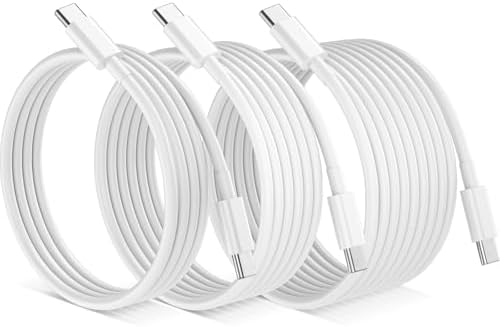
This was a notable shift. Every iPhone from the iPhone 5 through the iPhone 14 used Apple’s proprietary Lightning connector. Starting with the iPhone 15, Apple moved to USB-C, aligning the phone with the same connector already used on iPads, MacBooks, and most Android phones.
Practically, that means one end of your cable needs a USB-C plug to connect to the phone. What’s on the other end of the cable USB-C or USB-A depends on what you’re plugging it into, which we’ll cover below.
What Charger Cable Does the iPhone 15 Need?
To charge an iPhone 15, you need a cable with a USB-C connector on the phone end. The other end of the cable typically comes in one of two forms:
- USB-C to USB-C — plugs into a USB-C wall adapter or USB-C port on a laptop
- USB-C to USB-A — plugs into an older-style rectangular USB port, like the ones found on many wall chargers, car chargers, and older computers
It’s worth separating two things people often lump together: the cable and the wall adapter (also called the power brick or charging block). They’re different components. The cable is just the wire that carries power and data. The adapter is what plugs into the wall outlet and actually converts that electricity for the phone. You need a USB-C cable regardless of which adapter you use, but the adapter you pair it with affects charging speed.
Notably, Apple no longer includes a wall adapter in the box with the iPhone 15 — only the cable. So if you don’t already own a USB-C power adapter, that’s a separate purchase.
Which Charging Cable Is Best for iPhone 15?
“Best” depends on what you need the cable for, but a few factors consistently separate a good cable from a mediocre one.
Connector type. Both ends matter. Confirm the phone-side end is USB-C,
and check the other end against the port you’ll actually be using.
Charging speed support. Not all USB-C cables handle the same wattage. A cable rated for higher power delivery (PD) will support faster charging when paired with a compatible adapter. A cheap, thin cable may still charge the phone, just more slowly, and in some cases it may not support fast charging at all.
Data transfer. If you plan to transfer photos or sync files to a computer, you’ll want a cable that supports data transfer, not just power. Some ultra-cheap cables are built for charging only.
Build quality. Look at the connector housing and the strain relief where the cable meets the connector — that’s usually the first place a cheap cable fails.
Length. Shorter cables (1–3 feet) are convenient for desks and nightstands.
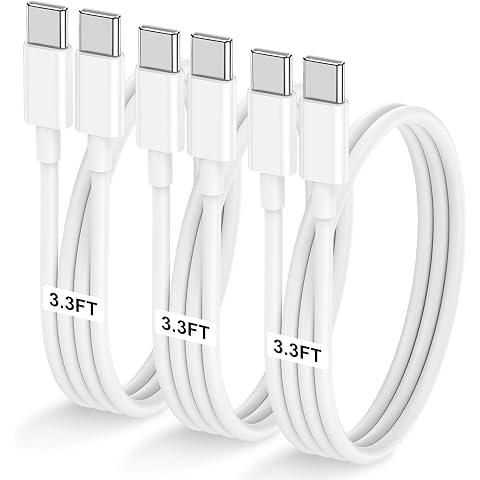
Longer cables (6 feet or more) are more practical for couches, beds, or car use where the outlet isn’t close by.
Certification. Cables that meet USB-IF (USB Implementers Forum) specifications are more likely to deliver consistent, safe performance. If a cable lists a specific certification, that’s generally a better sign than no information at all.
USB-C vs. Lightning: What’s the Difference?
USB-C and Lightning are both connector types, but they’re not interchangeable, and the underlying technology behind them is different too.
| Feature | Lightning | USB-C |
|---|---|---|
| Used on iPhone 15 | No | Yes |
| Used on iPhone 6–14 | Yes | No |
| Connector shape | Apple proprietary | Industry-standard, reversible |
| Found on other devices | Mostly older Apple products | iPads, MacBooks, most Android phones, many laptops |
| Data transfer speeds | Generally slower | Can support faster speeds, depending on cable and device |
| Physically interchangeable | Not with USB-C ports | Not with Lightning ports |
The key practical point: Lightning cables will not physically fit into an iPhone 15’s charging port, and USB-C cables will not fit into an iPhone 14 or earlier. The connectors are shaped differently and aren’t cross-compatible in either direction.
USB-C also isn’t unique to Apple. It’s a broadly adopted industry standard, which is part of why Apple made the switch it lets iPhone 15 owners use the same cables and chargers as many other devices they might already own.
iPhone 15 Charging Cable Compatibility
Because USB-C is a standard rather than an Apple-only connector, a wide range of USB-C cables from different manufacturers will work with the iPhone 15 for basic charging. That’s one of the practical upsides of the switch.
That said, compatibility for charging isn’t the same as compatibility for every feature. Some higher-end functions — like faster charging speeds or higher-speed data transfer on Pro models — may depend on the specific cable’s capabilities, not just whether it fits the port. A generic cable will typically still charge the phone; it just may not unlock every performance feature a more capable cable would.
If you’re unsure about specifications for your exact model, Apple’s official product pages list the charging and connectivity details for each iPhone 15 variant.
Can You Use an Older iPhone Charging Cable With iPhone 15?
Not directly, and here’s why. A standard Lightning cable the kind used with the iPhone 14 and earlier — has a Lightning connector, and that connector does not physically fit the iPhone 15’s USB-C port.
There is one exception worth knowing about: Lightning-to-USB-C cables exist and are sold by Apple and other manufacturers, but those are designed to let a USB-C accessory work with a Lightning-port device (or vice versa in some adapter setups) they’re not the same as saying your old iPhone cable works unmodified with the iPhone 15. In practice, if you own an iPhone 15, you’ll want a cable with a USB-C connector on the phone end, full stop.
If you have older USB-C accessories from other devices an iPad, a MacBook charger cable, or an Android phone’s cable, for instance those may already work with your iPhone 15, since the connector shape is the same industry standard.
What to Look for When Buying an iPhone 15 Charging Cable
When you’re actually shopping, run through these considerations:
- Connector type: USB-C on the phone end; USB-C or USB-A on the other end, depending on your adapter or device
- Charging performance: Check if the cable is rated to support the wattage your adapter delivers, especially if you care about fast charging
- Data transfer capability: Confirm the cable supports data sync if you plan to connect the phone to a computer
- Build quality: Braided or reinforced cables tend to hold up better to daily bending and pulling
- Length: Match the cable length to where you’ll actually be using it
- Brand reliability: Established accessory brands are more likely to publish accurate specs and honor warranties
- Safety: Avoid cables with no listed certification or specifications, particularly for higher-wattage fast charging
- Intended use: A bedside cable has different priorities (length, durability) than a travel cable (compactness) or a desk cable (data transfer)
Best Charging Cable for iPhone 15
There isn’t one single “best” cable for every iPhone 15 owner, because the right choice depends on how you’ll use it.
If you mainly charge overnight and don’t need fast charging, a basic, well-reviewed USB-C to USB-C cable from a reputable brand will do the job without any fuss.
If you want faster charging, look specifically for a cable rated to handle the power delivery wattage of your adapter — pairing a fast charger with an underrated cable won’t get you the faster speeds.
If you regularly move photos or files to a computer, prioritize a cable explicitly listed as supporting data transfer, and check the transfer speed rating if you’re working with large files like video.
If you travel often or toss your cable in a bag daily, a braided or reinforced cable will generally outlast a thin, basic one.
For exact charging specifications for your specific iPhone 15 model, checking Apple’s official technical specifications is the most reliable way to confirm what your device supports.
Frequently Asked Questions
What cable does iPhone 15 use? The iPhone 15 uses a USB-C cable. This applies across the entire iPhone 15 lineup.
Does iPhone 15 use USB-C or Lightning? USB-C. Apple switched away from Lightning starting with the iPhone 15, after using Lightning on iPhones from 2012 through 2022.
Can I use a USB-C cable with iPhone 15? Yes. Any standard USB-C cable can physically connect to the iPhone 15’s charging port. Performance features like fast charging or high-speed data transfer may vary by cable.
What charger cable does iPhone 15 need? A cable with a USB-C connector on the end that plugs into the phone. The other end should match whatever adapter, computer, or car charger you’re using usually also USB-C, or USB-A on older adapters.
Can I use my old Lightning cable with iPhone 15? No, not directly. A standard Lightning cable’s connector doesn’t fit the iPhone 15’s USB-C port. You’ll need a cable with a USB-C connector.
Is every USB-C cable compatible with iPhone 15? Every standard USB-C cable will fit and generally charge the phone, but not all of them support the same charging speeds or data transfer rates. Check the cable’s specifications if fast charging or file transfer speed matters to you.